
Google Photos photo books: print there or export photos
You can make a book through Google Photos where its print service is available, or download selected images and use another editor. Choose the route by the layout and output you need.
Start with 40 pages free. No card needed.
On 6 November 2026 we made a separate Google Photos album with 20 licensed sample JPEGs, uploaded at Original quality. Download all returned a ZIP containing 20 byte-identical JPEGs.
Using tbf means downloading image files and uploading them normally. This guide does not promise a direct Google Photos integration or a transfer of an existing Google book project.
What we checked on 6 November 2026
Make a photo book
Arrange your photos on the pages, check the proof and order a printed copy.
| Requirement | Print-store route | Exported-image workflow |
|---|---|---|
| An album already selected | Start from the album option | Download the chosen images |
| Different page arrangements | Check the current provider editor | Choose an editor that supports the layout |
| Scanned keepsakes | Check the supported content | Add suitable image files alongside photos |
| Original file record | Keep a separate source copy | Retain the untouched download |
| Delivery | Check account and provider availability | Check the chosen printer separately |
Check who fulfils the print order
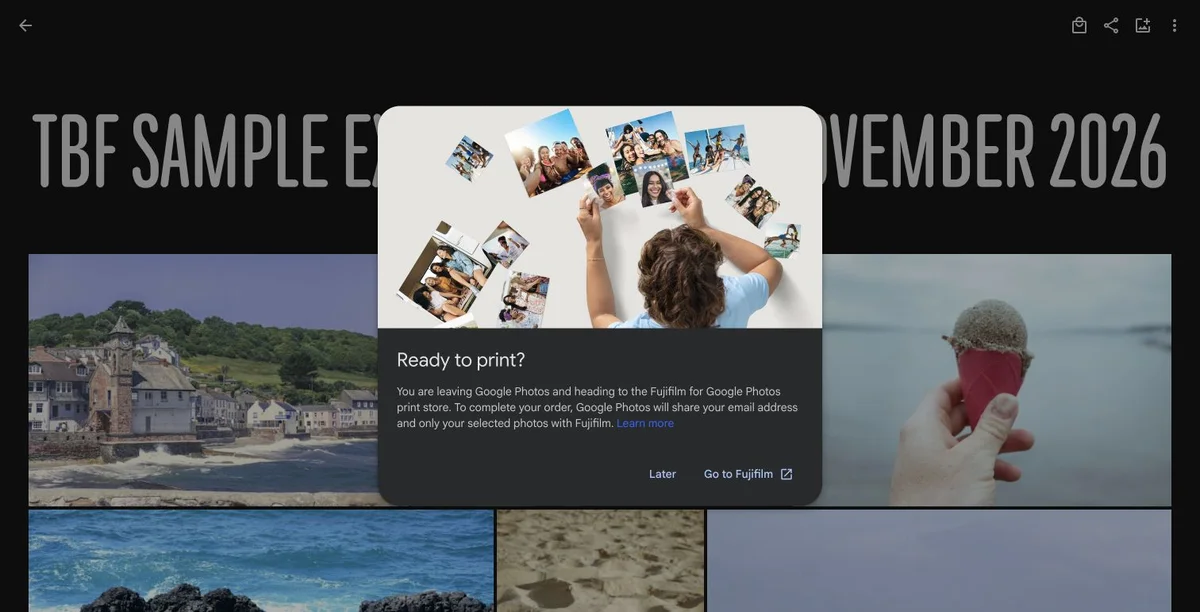
In our UK account, the album menu was Order photos, then Create new photo book. It opened a handoff to the Fujifilm for Google Photos print store, rather than keeping checkout inside Google Photos.
The handoff said it would share the account email and selected photos with Fujifilm. We stopped before that transfer. Check the destination, available formats and final price before continuing.
Download selected images for another editor
For the tested album, More options, then Download all produced one ZIP. After extraction, all 20 image files matched the uploaded JPEGs exactly, including their bytes and image dimensions.
This result applies to our Original-quality JPEG test. It does not establish what happens to edited photos, RAW files, videos or Storage saver uploads. Test your own formats before a larger export.
Check dates and image dimensions
Google notes that an operating system can assign a new timestamp to the downloaded file. Do not automatically treat that file date as the date of the photograph.
Inspect pixel dimensions after any crop. A thumbnail or screenshot is not a substitute for the downloadable image when a larger version is available.
Choose a route by the result you need
Use the built-in print service when its formats and workflow meet the brief. An independent editor can be useful when you need different page arrangements or scanned material beside the photos.
For a tbf book, upload the selected files and keep your own source folder. A PDF export is a reading or printing copy, not a backup of every editable object.
Steps
Choose the route
Compare the built-in print format with the book you want to make.
Select the images
Use one album or a small dated collection rather than an entire library.
Inspect the downloads
Check image dimensions, intended edits and date information.
Review the draft
Check every page before exporting or ordering a printed copy.
Questions
Can I turn a Google Photos album into a book?
Google describes a photo-book option from an album where its print service is available. You can also download selected files and arrange them in another editor.
Does tbf connect directly to Google Photos?
This workflow uses manual download and upload. It does not offer a direct account integration or import a Google photo-book project.
Why did the downloaded photos get a different date?
Google notes that the operating system can assign a new file timestamp. Check the photo metadata and your own records rather than sorting only by download date.