
Scrapbook template: a free blank page and how to adapt it
A scrapbook template is a page with fixed spaces for photos and writing. Download the blank page below, print it or use it as a guide, and change the boxes to fit your photos.
A template saves deciding where things go. The price is flexibility: your photos have to suit its boxes, or you change the boxes.
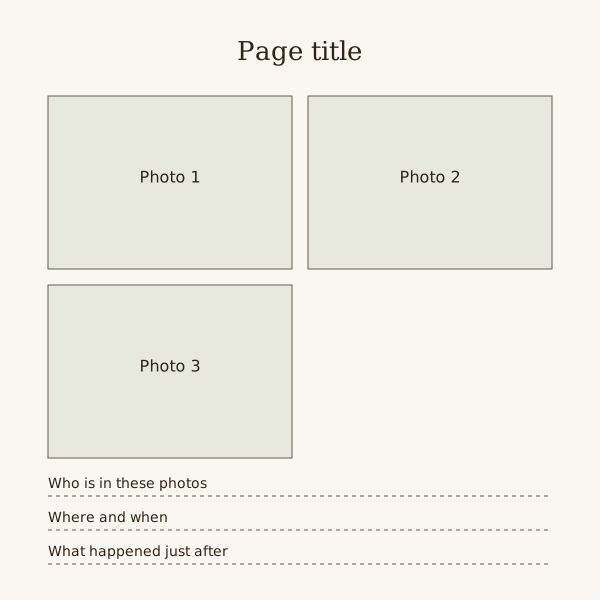
The page below has a title, three photo spaces and three writing lines. It is an SVG file, so it stays sharp at any size and opens in a browser or a vector editor.
Fill the pages online instead
Drop your photos onto editable pages and download a PDF.
Template, sketch or kit
A template is a page structure you fill in. A sketch is a drawing of where things go, copied onto your own paper. A kit is a matching set of papers and decorations.
Online editors call almost everything a template. Many come with sample photos, colours and fonts already set, which can take longer to strip out than a blank page takes to fill.
When a template helps
In each case below the gain is the same: the layout is decided once and then repeated.
- A run of similar pages, such as one per month.
- A book several people fill, where pages should match.
- A first book, when spacing is the hard part.
- A deadline, when choosing layouts would eat the time.
When it gets in the way
Mixed photo shapes fight fixed boxes. A tall portrait in a landscape box loses the top of someone's head or leaves bands of empty space.
A large keepsake, such as a certificate or a child's painting, needs a page to itself. Do not shrink it to fit a box meant for a print.
Empty boxes look like missing photos. With two pictures, use a two-photo page rather than leaving the third box blank.
Adapting this page
Keep an untouched copy of the file before changing anything, so you can start again.
- Merge two photo boxes into one for a landscape print.
- Delete a writing line and give the space to the photos.
- Move each writing line under a photo to turn it into a caption.
- Scale it to 8 by 8 or 12 by 12 inches; the page is square, so nothing distorts.
Steps
Choose the photos first
Pick the photos for the page before the template. Count them and note which are portrait and which are landscape.
Match or change the boxes
If the shapes match, use the page as it is. If not, merge or redraw boxes in a vector editor, or mark the change on the printout.
Fill the writing lines
Write the names, the place and date, and one thing that happened after the photos were taken.
Remove what you did not use
Delete or cover any empty box or unused line before finishing, so every blank area on the page looks intended.
Questions
What is a scrapbook template?
A page with fixed spaces for photos, a title and writing. You fill the spaces instead of planning a layout from nothing.
How do I print this template?
Open the SVG in a web browser and print it. To print at an exact album size, set the size first in a vector editor such as Inkscape.
Is a template the same as a scrapbook sketch?
No. A sketch is a drawing you copy onto your own paper; a template is the page itself, ready to fill or print.