
Yearbook mods: 14 sidebar ideas and where each fits
A mod is a self-contained sidebar with its own headline, pictures and labels. Run 1 to 3 on a spread, each 2 to 6 columns wide, covering an angle the main photos cannot.
A paid plan is required to create a yearbook. Printing is a separate order.
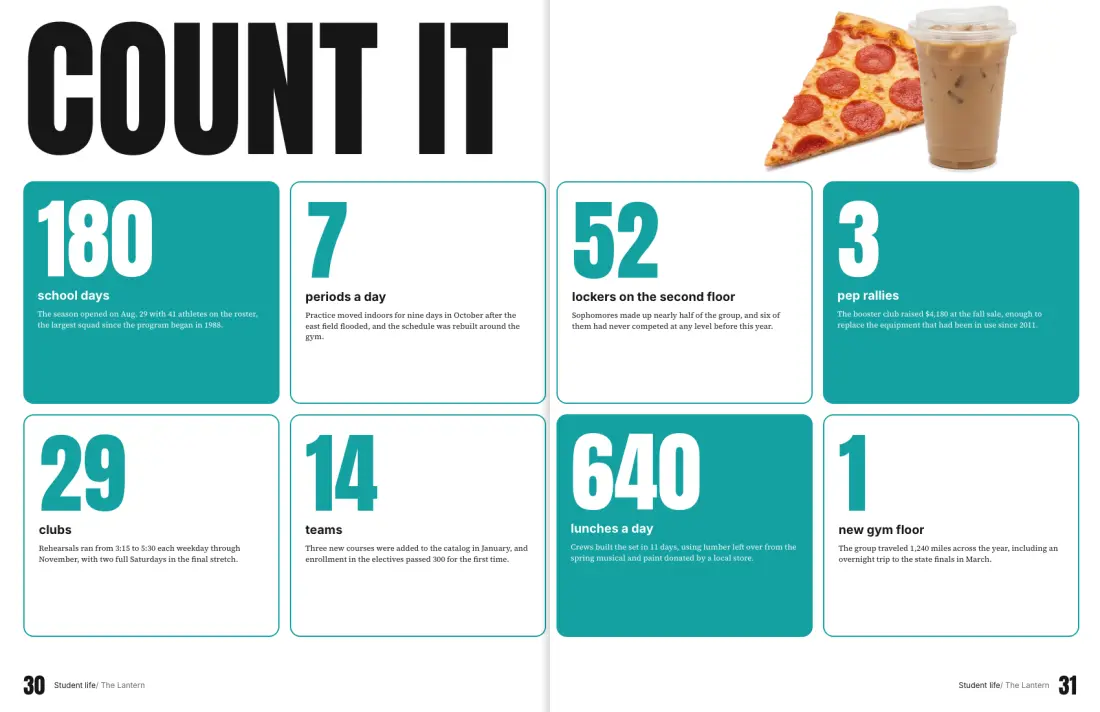
Mod is short for module. It is a box of secondary coverage on a spread, complete in itself: a small headline, its own pictures or figures, and its own captions or labels.
Mods get more people and more angles onto a spread. A sports spread with six action photos covers six moments; add a score strip and it covers the whole season.
The fourteen types below are described by structure only: the parts each has, how big it runs and which section it fits. The content comes from your own school year.
See also: Eight spread grids to place a mod on, Yearbook superlatives and how to run the vote.
Start a yearbook
Choose a style, a page count and space for each student. Start the yearbook online.
A paid plan is required to create a yearbook. Printing is a separate order. Plans and prices.
14 mod types and the section each fits
Numbers and answers
- 1. Poll: one question, 3 to 5 answer bars with percentages, the number of people asked. Fits student life and academics.
- 2. By the numbers: 4 to 6 large figures, each with a label of a few words and a source. Fits sport, clubs and the opening.
- 3. Quick question grid: one question, 6 to 9 head shots in rows, a name and a short answer under each. Fits any section.
- 4. Comparison: two columns under two headings with 4 to 6 matched rows. Fits academics and class against class.
- 5. Score strip: one row per fixture with date, opponent and result, the season record at the end. Fits every sports spread.
Time and place
- 6. Timeline: 5 to 8 dated points on one line, a small photo on every second point. Fits events, productions and trips.
- 7. Map: one drawn or photographed plan, 4 to 6 numbered pins and a key beside it. Fits trips, the campus and away fixtures.
- 8. Schedule: a clock-time column and an activity column, 6 to 10 rows, for one person or one team. Fits academics and show weeks.
- 9. Then and now: 2 photos of the same person, place or team side by side, each with a date label. Fits seniors and the closing.
- 10. Calendar strip: one month as a row of day boxes, 4 to 6 days marked with a photo or icon. Fits student life and dividers.
Pictures and lists
- 11. How-to steps: 3 to 5 numbered photos in sequence, a one-line label under each. Fits clubs, arts and science.
- 12. Ranked list: 5 to 10 numbered titles laid out like a playlist, with the number of votes. Fits student life.
- 13. Face grid: 8 to 16 equal square head shots with names only and no answers. Fits clubs, casts, squads and staff.
- 14. Object cut-outs: 5 to 8 objects with backgrounds removed, a label and a thin line to each. Fits sport, art and lockers.
| Size | Columns wide | Height | Holds |
|---|---|---|---|
| Strip | 6, the width of one page | About a fifth of the page | Timeline, score strip, calendar strip |
| Small box | 2 or 3 | About a third of the page | Poll, by the numbers |
| Wide box | 4 | About a third of the page | Quick question grid, comparison, how-to steps |
| Tall sidebar | 2 or 3 | Top margin to bottom margin | Schedule, ranked list, face grid |
| Half page | 6 | Half the page | Map, object cut-outs, then and now |
Download this table as a spreadsheet (CSV)
What a mod is, and what it is not
A mod sits on the same column grid as the rest of the spread and takes one rectangle of it. Its edge is drawn with a rule, a tint or a strip of empty space called a rail.
A mod is not the main story cut smaller. It answers a different question from the dominant photo and the copy: how many, in what order, who else, where, or compared with what.
Every mod needs a source you can check. Record who was asked, how many answered and on what date, and keep that sheet with the spread until the proof is signed off.
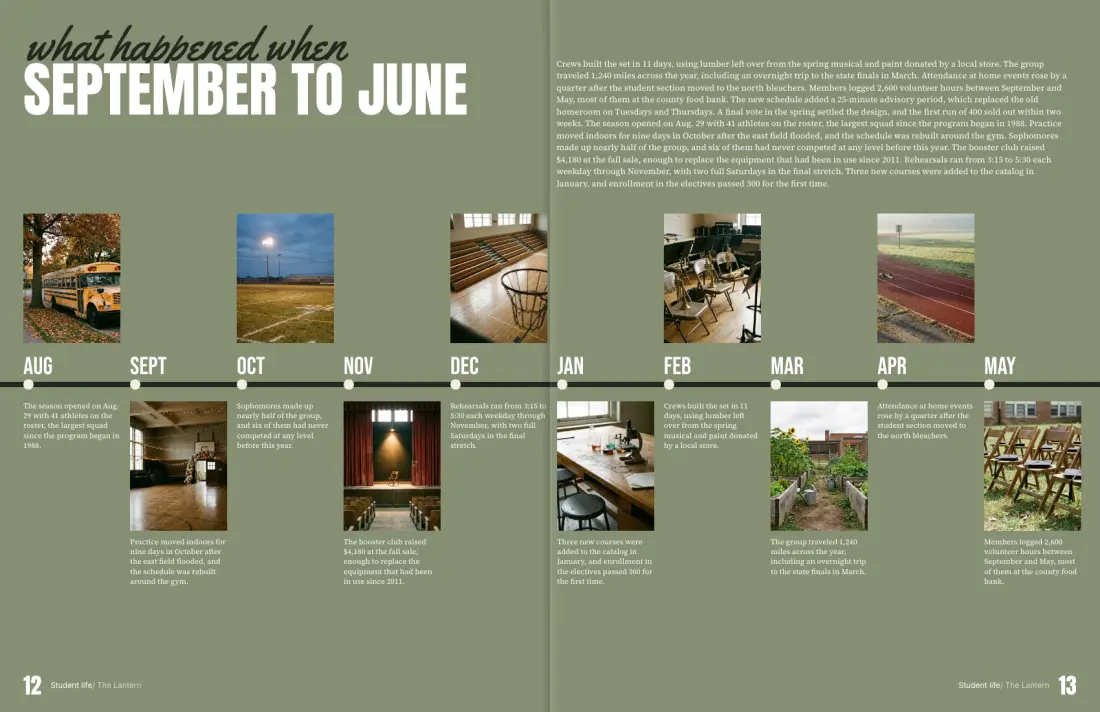
Sizes in columns
Size a mod in whole columns. On a 12 column spread the working widths are 2, 3, 4 and 6 columns, which leave the dominant photo and main copy at least half the spread.
Height follows the content. A strip is about a fifth of the page height, a box about a third, and a tall sidebar runs from the top margin to the bottom margin.
Separate the mod from the main story with a rail of about 3 picas, which is 13 mm or half an inch. Inside the mod, keep the usual 1 pica between every part.
How many to run on a spread
One to three mods on a spread is the working range. One is the safe number for a new team. Three needs a 12 column grid and a dominant photo that still leads.
Give all the mods together no more than a third of the spread. Past that point the main story reads as one more box, and the reader has no obvious place to start.
Reuse shapes. Pick three or four mod sizes for the whole book and repeat them, so a poll on page 20 and a poll on page 84 are recognisably the same device.
Match the mod to the material
Start from what you collected. Counted answers make a poll, dated events make a timeline, a place makes a map, a sequence makes how-to steps and a set of faces makes a face grid.
Check the numbers before design. A poll needs the number of people asked printed beside it and percentages that add up to 100. A score strip needs every result confirmed.
Names in a mod follow the same rule as captions: checked against a list from the school, with the school's opt-out list applied before any face or name is placed.
Building mods in a browser
In tbf scrapbook a mod is something you build on a shared page from photos, stickers and your own writing. You bring the counted results and lay them out in the studio.
The yearbook setup gives 12 to 100 shared pages, and pages stay editable, so a mod can go onto a spread late. Leave its space empty in the plan until the figures are in.
Pages to make
Pick the question
Decide what the main photos leave out: how many, when, where or who else.
Collect and count
Ask, tally and date the answers. Write down how many people you asked.
Choose type and size
Match the material to one of the 14 types and a size in whole columns.
Place and separate
Put it on the grid, leave a rail around it and check every name and figure.
Questions
What are mods in a yearbook?
Self-contained sidebars on a spread. Each has its own small headline, pictures or figures and labels, and covers an angle the main photos and copy do not.
How many mods should a yearbook spread have?
One to three. Keep their combined area under a third of the spread so the dominant photo still leads.
Can I make this in tbf scrapbook?
Yes, on a paid plan. You build each mod on a shared page from photos, stickers and your own writing, and you bring the counted results. A yearbook has 12 to 100 shared pages.
Sources
Before you finish
Plan the yearbook pages
Choose the number of students, their space and the shared pages in Studio. The total includes both covers and must be even, up to 300 pages.
A family book can use shared pages without individual student pages. Print limits depend on the binding you choose.