
Yearbook divider pages: 7 ways to open a section
A divider is the page or spread that opens a section. Use one per section, usually 5 to 7 in a book, all in one format: one image, the section name and a theme element.
A paid plan is required to create a yearbook. Printing is a separate order.
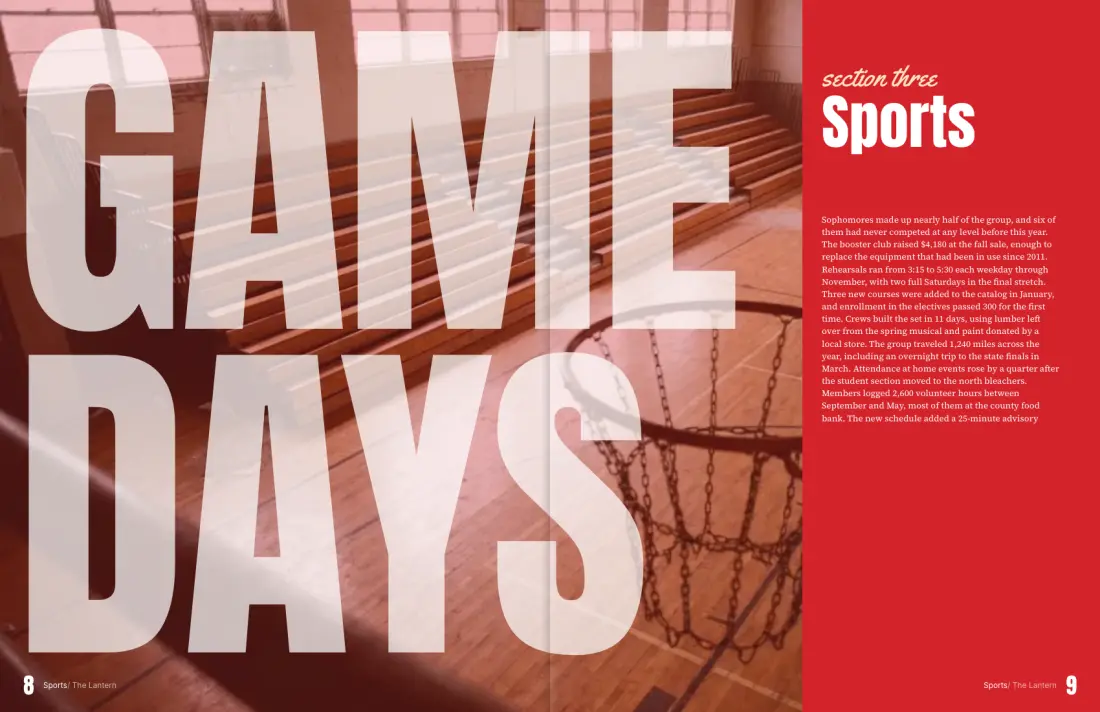
A divider tells the reader that one part of the book has ended and another has begun. It carries the section name, one strong visual and a link back to the theme.
After the folio, the divider is the most repeated design in the book. The format is chosen once, at the start, and applied to every section without exception.
Seven formats follow. Each works as a single page or a spread, and each needs only a section name and material the staff already has.
See also: Count the dividers into the ladder, The opening spread that the dividers echo.
Start a yearbook
Choose a style, a page count and space for each student. Start the yearbook online.
A paid plan is required to create a yearbook. Printing is a separate order. Plans and prices.
| Format | What is on it | Page or spread | Suits |
|---|---|---|---|
| 1. Full-bleed photo with one word | One photo to all four edges, the section name on a calm area | Spread, or a single page if the photo is upright | Books with a strong photographer |
| 2. Big numeral | The section number or first page number at half the page height, name beside it | Single page | Type-led themes and short books |
| 3. Cut-out object | One object from the section, background removed, on a plain field | Single page or spread | Sports, arts and themes built on things |
| 4. Colour block | A flat field of one colour per section, the name reversed out | Single page | Colour-coded books with matching folios |
| 5. Contents-of-section list | The spreads in the section with their page numbers and one small photo | Single page | Long books of 200 pages or more |
| 6. Timeline strip | The section's dates on one line across the foot, a photo above | Spread | Books in date order, divided by season |
| 7. Photo grid | 9 to 16 equal squares previewing the section, the name in one square | Single page or spread | Sections with many good small photos and no clear lead |
Download this table as a spreadsheet (CSV)
How many dividers a book needs
One per section. The usual sections are student life, academics, clubs, sports and people, plus ads and index where the book has them, which gives 5 to 7 dividers.
A book that runs in date order divides by season or term instead and needs 3 or 4. A short elementary book divided by grade has one divider for each grade.
Count them into the ladder before anything else is placed. Seven spread dividers take 14 pages, close to a whole 16 page signature, before a single event is covered.

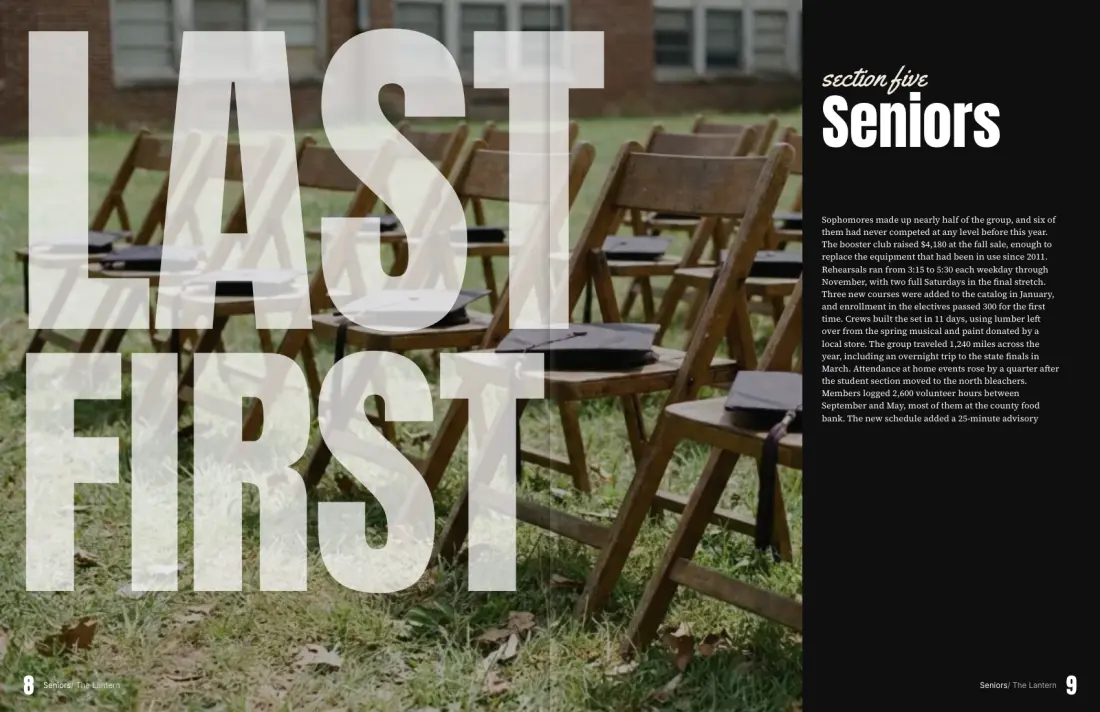
Single page or spread
A spread divider starts on a left-hand page, so the section before it must end on a right-hand page. That fixes every section at an even number of pages.
A single-page divider goes on the right, where the eye lands first, and faces the last page of the previous section. It suits a short book where pages are scarce.
In a tbf scrapbook yearbook, dividers come out of the 12 to 100 shared pages. Six spread dividers would use 12 of them, so a small book does better with single pages.
The seven formats
The seven differ in what does the work: a photo, a number, an object, a colour, a list, a line of dates or a grid. Choose the one your photos and theme can supply for every section.
Test the choice on your weakest section. If academics has no photo good enough to run across a spread, the full-bleed format fails there, and a type-led format will not.
- 1. Full-bleed photo with one word: the picture fills the page or spread and the section name sits on a calm area
- 2. Big numeral: the section number, or its first page number, set at half the page height
- 3. Cut-out object: one object from the section with its background removed, on a plain field
- 4. Colour block: a flat field of one theme colour per section with the name reversed out in white
- 5. Contents-of-section list: the spreads inside the section with their page numbers
- 6. Timeline strip: the section's dates on one line across the foot, with a photo above
- 7. Photo grid: 9 to 16 equal squares previewing the section, the name in one square
Keeping them consistent
Fix five things and change two. Fixed: page or spread, the position of the section name, its typeface and size, the theme element and the folio. Changing: the image and the colour.
Build one divider, duplicate it for every section and swap the picture. Compare them side by side as thumbnails before the proof; a name set 1 pica lower on one will show.
The section name on the divider is the name used in the contents and in the folio of every page that follows. Decide its spelling and capitals once.
What a divider leaves out
A divider is not a coverage spread. It has no cluster of captioned photos, no mod and no story, though a short block of theme copy a few lines long is common.
If faces in the divider photo are recognisable, name the people in one small caption at the edge. The usual checks apply: names against the list, opt-outs applied.
Pages to make
Count the sections
List the sections and settle the number of dividers, usually 5 to 7.
Choose page or spread
Check the ladder: a spread needs the section before it to end on a right-hand page.
Pick one format
Choose from the seven and test it on the section with the weakest photos.
Duplicate and swap
Build one divider, copy it for every section and change only the image and the colour.
Questions
What is a divider page in a yearbook?
The page or spread that opens a section. It carries the section name, one strong visual and a theme element, in the same format for every section.
Should a yearbook divider be one page or two?
A spread has more presence and uses two pages per section. A single right-hand page suits a short book. Choose one and use it for every section.
Can I make this in tbf scrapbook?
Yes, on a paid plan. Dividers are shared pages you design yourself, out of the 12 to 100 the yearbook setup allows. The seven formats here are not presets.
Sources
Before you finish
Plan the yearbook pages
Choose the number of students, their space and the shared pages in Studio. The total includes both covers and must be even, up to 300 pages.
A family book can use shared pages without individual student pages. Print limits depend on the binding you choose.